VMware planning / 01
Your VMware Renewal Is a Workload Decision
Decide what to keep before you decide where to move. A renewal quote and a cloud calculator cannot make that decision for you.
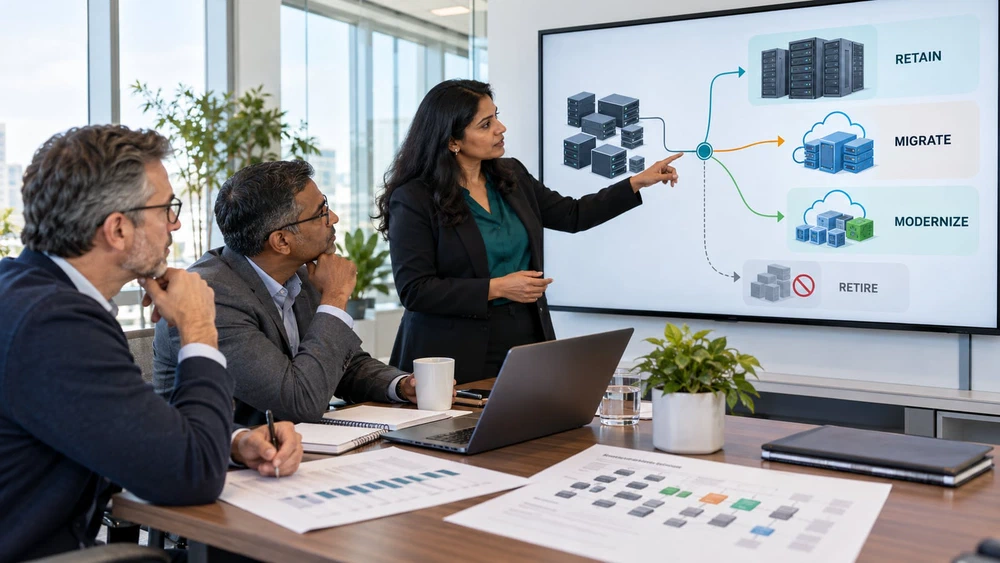
Before renewing VMware or choosing a replacement, assess the workloads, compare the full cost of staying and changing, and establish who will operate the result.
The renewal quote tells you what staying will cost. It does not tell you what leaving will cost.
That is where a difficult infrastructure decision often begins. Finance wants a credible alternative. Engineering wants to avoid a rushed move. Application owners want their systems left alone until someone explains what changes for them.
Opening a cloud calculator feels like progress. But which servers belong in it? The idle reporting instance? The database supporting three applications? The plant system whose vendor only supports its current configuration?
Until those questions have answers, the calculator is pricing an assumption.
The Deadline Does Not Choose the Destination
A support milestone, contract renewal, or hardware refresh can set the clock. None tells you where an application belongs.
Broadcom lists October 11, 2027 as End of Service for ESXi 8.x, vCenter Server 8.x, vSAN 8.x, NSX 4.x, and VCF 5.2.x. Check the product-specific lifecycle notice against your versions and contracts. VVF for VDI follows a separate lifecycle. This is not a universal deadline for every VMware deployment.
The deadline may change your sequence. It should not replace the assessment.
Find Out What You Actually Need to Keep
A VM inventory is useful. A migration plan needs more: the application it supports, a business owner, dependencies, observed demand, support constraints, and recovery requirements.
An apparently quiet server may run a month-end job. A small database may sit behind a critical customer workflow. Low utilization is a reason to investigate, not permission to switch something off.
Give each workload a documented treatment. Retain it where constraints justify staying. Retire it when ownership and retention checks allow. Rehost compatible applications, adopt managed services selectively, and reserve architectural changes for work with a clear payoff.
Retain where business or technical constraints justify it.
Move compatible applications without a redesign.
Adopt managed services with targeted changes.
Change architecture where the benefit warrants it.
Remove systems after ownership and retention checks.
Resolve missing evidence before choosing a path.
The sixth path matters. If nobody can explain a dependency or confirm a licensing constraint, record Investigate with an owner and next action. Uncertainty belongs in the plan, not underneath a confident-looking estimate.
What Changed in a Manufacturing Engagement
Applied AI Consulting (AAIC) worked with an anonymous industrial manufacturer whose VMware environment covered 186 VM workloads, 72 TB of storage, and more than 40 applications.
The decision register did not say “move 186 VMs.” It identified 82 for rehosting, 31 for replatforming, 24 for modernization, 27 for retention, 14 for retirement, and eight for investigation.
Twenty-three workloads were rightsized before placement. They were a subset of the rehosting group, not additional workloads. Plant constraints also mattered: some systems had reasons to remain close to their existing operating environment.
The engagement achieved 30% lower infrastructure total cost of ownership (TCO) over 3 years. That result belongs to this engagement; it is not a forecast for another company. The useful lesson is the process: remove unnecessary work and choose suitable treatments before committing to migration.
Read the manufacturing migration case study for the workload breakdown, six migration waves, and operational approach.
Compare Two Operating Models, Not Two Price Lists
The current infrastructure cost and the proposed cloud bill rarely cover the same things.
On the current side, account for licensing, hardware refresh, facilities, backup, recovery, monitoring, and operational effort. On the destination side, include compute, storage performance, data transfer, connectivity, security, support, and the engineering needed to run it.
Then add the transition: discovery, testing, migration delivery, temporary dual running, reconciliation, training, and decommissioning. Separate one-time costs from recurring costs. Use the same comparison period.
Test the assumptions that could change the answer. What if fewer applications can retire? What if a database requires a different license? What if one plant system must remain on-premises through another renewal?
Microsoft’s Azure Migrate assessment guidance distinguishes readiness, performance-based rightsizing, and target resource costs. Those estimates inform the business case; they do not replace its wider operating assumptions.
Choose the Destination After the Workload Decision
AWS, Azure, Google Cloud, and retained infrastructure can all have a role. Kubernetes is an application and platform-engineering decision, not an automatic replacement for a hypervisor.
Where AWS fits, its Optimization and Licensing Assessment and Migration Acceleration Program may support the assessment and transition. Confirm eligibility and approval before including incentives in a committed business case. A program benefit should strengthen a sound destination choice, not make the choice for you.
The same discipline applies to any other destination: can the application work there, can it recover there, and can your team operate it there?
Take One Decision into the Next Meeting
Start with one important business service rather than a debate about every VM.
- Who owns the service and its acceptance decision?
- What must move together, and what evidence supports that view?
- Which support, data, recovery, or latency constraints could block the preferred path?
- What assumptions drive the cost comparison?
- Who will own the service after the change?
Use the VMware Workload Decision Guide and its worksheet to capture those answers. Then read why the migration plan needs more than a cutover date.
A useful renewal conversation ends with clearer decisions, named owners, and visible unknowns. The cloud quote can come after that.
Practical Questions
Do we have to migrate every VMware workload?
Is cloud migration always cheaper than renewing VMware?
What should a VMware migration assessment produce?
Decide → Transform → Operate
Bring Us Your VMware Renewal Decision
Let’s identify what needs to move, what can stay, and which assumptions need testing before you commit.